components of relative motion are ignored. When the unsymmetric matrix storage and solution scheme are used, the stiffness can depend on frequency, temperature, and field variables. See “Input syntax rules,” Section 1.2.1, for further information about defining data as functions of frequency, temperature and field variables. Input File Usage: Use the following options to define unsymmetric linear coupled stiffness connector behavior: ```txt *CONNECTOR BEHAVIOR, NAME=name *CONNECTOR ELASTICITY, UNSYMM, FREQUENCY DEPENDENCE=ON ``` Abaqus/CAE Usage: Unsymmetric linear coupled stiffness behavior is not supported in Abaqus/CAE. # Defining nonlinear elastic behavior For nonlinear elasticity you specify forces or moments as nonlinear functions of one or more available components of relative motion, $F _ { i } ( u _ { 1 } , u _ { 2 } , \dots )$ . These functions can also depend on temperature and field variables. See “Input syntax rules,” Section 1.2.1, for further information about defining data as functions of temperature and field variables. # Defining nonlinear elastic behavior that depends on one component direction By default, each nonlinear force or moment function depends only on the displacement or rotation in the direction of the specified component of relative motion. Input File Usage: Use the following options: ```txt *CONNECTOR BEHAVIOR, NAME=name *CONNECTOR ELASTICITY, COMPONENT=component number, NONLINEAR, DEPENDENCIES=n ``` Abaqus/CAE Usage: Interaction module: connector section editor: Add→Elasticity: Definition: Nonlinear, Force/Moment: component or components, Coupling: Uncoupled # Defining nonlinear elastic behavior that depends on several component directions Alternatively, the functions can depend on the relative positions or constitutive displacements/rotations in several component directions, as described in “Defining nonlinear connector behavior properties to depend on relative positions or constitutive displacements/rotations” in “Connector behavior,” Section 31.2.1. In this case the operator matrices are unsymmetric when $\partial F _ { i } / \partial u _ { j } \ne \partial F _ { j } / \partial u _ { i }$ , for $i \neq j$ , and unsymmetric matrix storage and solution may be needed in Abaqus/Standard to improve convergence. Input File Usage: Use the following options to define nonlinear elastic connector behavior that depends on components of relative position: ```txt *CONNECTOR BEHAVIOR, NAME=name ``` \*CONNECTOR ELASTICITY, COMPONENT=component number, NONLINEAR, INDEPENDENT COMPONENTS=POSITION, DEPENDENCIES=n Use the following options to define nonlinear elastic connector behavior that depends on components of constitutive displacements or rotations: \*CONNECTOR BEHAVIOR, NAME=name \*CONNECTOR ELASTICITY, COMPONENT=component number, NONLINEAR, INDEPENDENT COMPONENTS=CONSTITUTIVE MOTION, DEPENDENCIES=n Abaqus/CAE Usage: Interaction module: connector section editor: Add→Elasticity: Definition: Nonlinear, Force/Moment: component or components, Coupling: Coupled on position or Coupled on motion # Examples The combined connector in Figure 31.2.2–1 has two available components of relative motion: the relative displacement along the 1-direction (from the SLOT connection) and the rotation around the 1-direction (from the REVOLUTE connection)—see “Connection-type library,” Section 31.1.5. Thus, the connector components of relative motion 1 and 4 can be used to specify connector behavior. ![](images/page-692_3337ac59d0457562532e6a9d9a2f555e35d2556b5304b3744f2f42c33203fcb0.jpg)
text_image extensible range 7.5
![](images/page-692_1d1a4420cf20674609cc5c6159e449ad76413503559f961dc2dbb32a6795570a.jpg)
text_image node 12 b 1 (local orientation) a 2 node 11
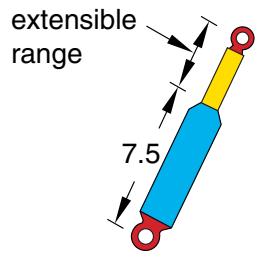
Figure 31.2.2–1 Simplified connector model of a shock absorber. To define a nonlinear torsional spring to resist the relative rotation between the top and the bottom connection point around the local 1-direction, use the following input: ```txt *CONNECTOR SECTION, ELSET=shock, BEHAVIOR=sbehavior slot, revolute ori, *CONNECTOR BEHAVIOR, NAME=sbehavior *CONNECTOR ELASTICITY, COMPONENT=4, NONLINEAR -900., -0.7 0., 0.0 1250., 0.7 ``` Although no elastic coupling is assumed to occur between the two available components of relative motion, you could replace the nonlinear moment versus rotation data with coupled linear elastic behavior to define the rotational stiffness around the shock’s axis coupled to the axial displacement. In another application this same connector may have coupled linear elastic behavior, in the sense that relative rotation and sliding affect each other through a linear coupling. To define a translational stiffness of 2000.0 units, the $D _ { 1 1 }$ constant (the 1st entry of a symmetric matrix) is entered in the connector elasticity definition. To define a torsional stiffness of 1000.0 units, the $D _ { 4 4 }$ constant (the 10th entry of a symmetric matrix) is entered; and to define a coupling stiffness of 50.0 units between the available rotation and displacement, the $D _ { 1 4 }$ constant (the 7th entry) is entered. ```csv *CONNECTOR ELASTICITY 2000.0, , , , , , 50.0, 0.0, 1000.0, , , , , , , , , ``` # Defining rigid connector behavior Rigid-like elastic connector behavior can be used to make an otherwise available component of relative motion rigid. Consider a CARTESIAN connector that has no intrinsic kinematic constraints. If rigid behavior is specified in the local 2- and 3-directions, the connector will behave in a similar fashion to a SLOT connector. This technique of using connectors with available components of relative motion for which rigid behavior is specified instead of connectors with intrinsically kinematic constraints is particularly useful when you need to: • customize the constrained components in a connector with available components of relative motion; for example, you can constrain the local 1- and 2-directions in a CARTESIAN connector to define a SLOT-like connector in the 3-direction; • define rigid plastic behavior (see “Connector plastic behavior,” Section 31.2.6); or • define rigid damage behavior (see “Connector damage behavior,” Section 31.2.7). For example, if you use a SLOT connector, plasticity and damage behavior cannot be specified in the intrinsically constrained 2- and 3-directions. To resolve the issue, you can use a CARTESIAN connector with rigid behavior in components 2 and 3 as discussed above and then define rigid plasticity (and/or damage) in these components. See the examples in “Connector plastic behavior,” Section 31.2.6, for illustrations. In Abaqus/Standard an overconstraint may occur if a rigid component is defined in the same local direction as an active connector stop, connector lock, or specified connector motion. # Input File Usage: Use the following option to define rigid connector behavior for a specified component of relative motion: $* { \mathrm { C O N N E C T O R ~ E L A S T I C I T Y } } , { \mathrm { R I G I D } } , { \mathrm { C O M P O N E N T } } = n$ Use the following option to define rigid connector behavior for multiple specified components of relative motion: \*CONNECTOR ELASTICITY, RIGID data line listing components to be made rigid Use the following option to define rigid connector behavior for all available components of relative motion: \*CONNECTOR ELASTICITY, RIGID (no data lines) Abaqus/CAE Usage: Interaction module: connector section editor: Add→Elasticity: Definition: Rigid, Components: component or components # Enforcing rigid-like elastic behavior Rigid-like elastic behavior in a particular component is enforced by using a stiff, linear elastic spring in that component. The stiffness of the spring is chosen automatically and depends on the circumstances in which the connector is used. In Abaqus/Standard the stiffness is taken to be 10 times larger than the average stiffness of the surrounding elements to which the connector element attaches. If the average stiffness cannot be computed (as would be the case when the connector element does not attach to other elements or attaches to rigid bodies), a stiffness of is used. In Abaqus/Explicit a Courant stiffness is first computed by considering the average mass at the connector element nodes and the stable time increment in the analysis. In most cases the Courant stiffness is then used to calculate the value of the rigid-like elastic behavior using heuristics that depend on modeling circumstances and the precision (single or double) of the analysis. For example, if plasticity is defined in the connector, the rigid-like elastic stiffness in components involved in the plasticity definition does not exceed one thousandth of the initial yield value. If plasticity is not defined, the rigid-like stiffness is computed as a multiple of the Courant stiffness. In most cases, the heuristics used in the computation of the rigid-like stiffness produces a stiffness value that is adequate. If this stiffness does not serve the needs of your application, you can always customize the elastic stiffness by specifying the linear stiffness value directly. Due to the different stiffness values used for rigid-like elastic behavior in Abaqus/Standard and Abaqus/Explicit, you may notice a discontinuity in the behavior when such a model is imported from one solver to the other. # Defining elastic connector behavior in linear perturbation procedures Available components of relative motion with connector elasticity use the linearized elastic stiffness from the base state. In direct-solution steady-state dynamic and subspace-based steady-state dynamic analyses, the linear elastic stiffness defined by an uncoupled connector elasticity behavior may be frequency dependent. # Output The Abaqus output variables available for connectors are listed in “Abaqus/Standard output variable identifiers,” Section 4.2.1, and “Abaqus/Explicit output variable identifiers,” Section 4.2.2. The following output variables are of particular interest when defining elasticity in connectors:
CUConnector relative displacements/rotations.
CUEConnector elastic displacements/rotations.
CEFConnector elastic forces/moments.
# Additional reference • Genta, G., Dynamics of Rotating Systems, Springer, 2005. # 31.2.3 CONNECTOR DAMPING BEHAVIOR Products: Abaqus/Standard Abaqus/Explicit Abaqus/CAE # References • “Connectors: overview,” Section 31.1.1 • “Connector behavior,” Section 31.2.1 • \*CONNECTOR BEHAVIOR • \*CONNECTOR DAMPING • “Defining damping,” Section 15.17.2 of the Abaqus/CAE User’s Guide, in the HTML version of this guide # Overview Connector damping behavior: • can be of a dashpot-like viscous nature in transient or steady-state dynamic analyses; • can be of a “structural” nature, related to complex stiffness, for steady-state dynamics procedures that support non-diagonal damping; • can be defined in any connector with available components of relative motion; • can be specified for each available component of relative motion independently, in which case the behavior can be linear or nonlinear for viscous nature damping; • can be specified as dependent on relative positions or constitutive motions in several local directions for viscous nature damping; and • can be specified for all available components of relative motion as coupled damping behavior. The directions in which the forces and moments act and the relative velocities are measured are determined by the local directions as described in “Connection-type library,” Section 31.1.5, for each connection type. In dynamic analysis the relative velocities are obtained as part of the integration operator; in quasi-static analysis in Abaqus/Standard the relative velocities are obtained by dividing the relative displacement increments by the time increment. # Defining linear uncoupled viscous damping behavior In the simplest case of linear uncoupled damping you define the damping coefficients for the selected components $( \mathrm { i } . \mathrm { e } . , C _ { 1 1 }$ for component 1, $C _ { 2 2 }$ for component 2, etc.), which are used in the equation $$ F _ {i} = C _ {i i} v _ {i} \quad (\text { no sum on } i), $$ where $F _ { i }$ is the force or moment in the $i ^ { \mathrm { t h } }$ component of relative motion and $v _ { i }$ is the velocity or angular velocity in the $i ^ { \mathrm { t h } }$ direction. The damping coefficient can depend on frequency (in Abaqus/Standard), temperature, and field variables. See “Input syntax rules,” Section 1.2.1, for further information about defining data as functions of frequency, temperature, and field variables. If frequency-dependent damping behavior is specified in an Abaqus/Standard analysis procedure other than direct solution steady-state dynamics, the data for the lowest frequency given will be used. Input File Usage: Use the following options to define linear uncoupled damping connector behavior: \*CONNECTOR BEHAVIOR, NAME=name \*CONNECTOR DAMPING, COMPONENT=component number, DEPENDENCIES=n Abaqus/CAE Usage: Interaction module: connector section editor: Add→Damping: Definition: Linear, Force/Moment: component or components, Coupling: Uncoupled # Defining linear coupled viscous damping behavior In the linear coupled case you define the damping coefficient matrix components, $C _ { i j }$ , which are used in the equation $$ F _ {i} = \sum_ {j} C _ {i j} v _ {j}, $$ where $F _ { i }$ is the force in the $i ^ { \mathrm { t h } }$ component of relative motion, $v _ { j }$ is the velocity in the $j ^ { \mathrm { t h } }$ component, and $C _ { i j }$ is the coupling between the $i ^ { \mathrm { t h } }$ and $j ^ { \mathrm { t h } }$ components. The $c$ matrix is assumed to be symmetric, so only the upper triangle of the matrix is specified. In connectors with kinematic constraints the entries that correspond to the constrained components of relative motion will be ignored. The damping coefficient can depend on temperature and field variables. See “Input syntax rules,” Section 1.2.1, for further information about defining data as functions of temperature and field variables. Input File Usage: Use the following options to define linear coupled damping connector behavior: \*CONNECTOR BEHAVIOR, NAME=name $* { \mathrm { C O N N E C T O R ~ D A M P I N G } } , { \mathrm { D E P E N D E N C I E S } } = n$ Abaqus/CAE Usage: Interaction module: connector section editor: Add→Damping: Definition: Linear, Force/Moment: component or components, Coupling: Coupled # Defining unsymmetric linear coupled viscous damping behavior As with linear coupled elastic behavior (“Connector elastic behavior,” Section 31.2.2), Abaqus/Standard allows you to define an unsymmetric coupled viscous damping matrix. In the linear coupled case you define the damping coefficient matrix components, $C _ { i j }$ , which are used in the equation $$ F _ {i} = \sum_ {j} C _ {i j} v _ {j}, $$ where $F _ { i }$ is the force in the $i ^ { \mathrm { t h } }$ component of relative motion, $v _ { j }$ is the velocity in the $j ^ { \mathrm { t h } }$ component, and $C _ { i j }$ is the coupling between the $i ^ { \mathrm { t h } }$ and $j ^ { \mathrm { t h } }$ components. The C matrix is assumed to be unsymmetric, so the entire matrix is specified. The entries that correspond to the constrained components of relative motion are ignored. When the unsymmetric matrix storage and solution scheme are used, the damping coefficients can depend on frequency, temperature, and field variables. See “Input syntax rules,” Section 1.2.1, for further information about defining data as functions of frequency, temperature and field variables. Input File Usage: Use the following options to define unsymmetric linear coupled viscous damping connector behavior: ```txt *CONNECTOR BEHAVIOR, NAME=name *CONNECTOR DAMPING, UNSYMM, FREQUENCY DEPENDENCE=ON ``` Abaqus/CAE Usage: Unsymmetric linear coupled viscous damping behavior is not supported in Abaqus/CAE. # Defining nonlinear viscous damping behavior For nonlinear damping you specify forces or moments as nonlinear functions of the velocity in the available components of relative motion directions, $F _ { i } ( v _ { 1 } , v _ { 2 } , \dots )$ . These functions can also depend on temperature and field variables. See “Input syntax rules,” Section 1.2.1, for further information about defining data as functions of temperature and field variables. # Defining nonlinear viscous damping behavior that depends on one component direction By default, each nonlinear force or moment function is dependent only on the velocity in the direction of the specified component of relative motion. Input File Usage: Use the following options: ```txt *CONNECTOR BEHAVIOR, NAME=name *CONNECTOR DAMPING, COMPONENT=component number, NONLINEAR, DEPENDENCIES=n ``` Abaqus/CAE Usage: Interaction module: connector section editor: Add→Damping: ```txt Definition: Nonlinear, Force/Moment: component or components, Coupling: Uncoupled ``` # Defining nonlinear viscous damping behavior that depends on several component directions Alternatively, the functions can depend on the relative positions or constitutive displacements/rotations in several component directions, as described in “Defining nonlinear connector behavior properties to depend on relative positions or constitutive displacements/rotations” in “Connector behavior,” Section 31.2.1. Input File Usage: Use the following options to define nonlinear damping connector behavior that depends on components of relative position: ```txt *CONNECTOR BEHAVIOR, NAME=name *CONNECTOR DAMPING, COMPONENT=component number, NONLINEAR, INDEPENDENT COMPONENTS=POSITION, DEPENDENCIES=n ``` Use the following options to define nonlinear damping connector behavior that depends on components of constitutive displacements or rotations: \*CONNECTOR BEHAVIOR, NAME=name \*CONNECTOR DAMPING, COMPONENT=component number, NONLINEAR, INDEPENDENT COMPONENTS=CONSTITUTIVE MOTION, DEPENDENCIES=n Abaqus/CAE Usage: Interaction module: connector section editor: Add→Damping: Definition: Nonlinear, Force/Moment: component or components, Coupling: Coupled on position or Coupled on motion # Example Refer to the example in Figure 31.2.3–1. ![](images/page-700_5025a40253c93623917cfc81ec6740e4523ac56fd5504f4376f7b45ca8fe27d1.jpg)
text_image extensible range 7.5
![](images/page-700_70569bbd686cb855a19884287768a1e695a2b4beb524be55461a7c73c4fa2f6c.jpg)
text_image 2 a 1 (local orientation) node 11 b node 12
Figure 31.2.3–1 Simplified connector model of a shock absorber. In addition to the torsional spring resisting relative rotations, the shock absorber damps translational motion along the line of the shock with a dashpot. To include a nonlinear dashpot behavior that is dependent on the relative position between the attachment points, use the following input: ```csv *CONNECTOR BEHAVIOR, NAME=sbehavior ... *CONNECTOR DAMPING, COMPONENT=1, INDEPENDENT COMPONENTS=POSITION, NONLINEAR 1 1500.0, 0.1, 0.0 1625.0, 0.2, 0.0 1750.0, 0.1, 10.0 1925.0, 0.2, 10.0 ``` # Defining linear structural damping behavior Structural connector damping is supported in steady-state dynamics and modal transient procedures that support non-diagonal damping (for example, direct solution steady-state dynamics).