# 36.3.1 DEFINING CONTACT PAIRS IN Abaqus/Standard Products: Abaqus/Standard Abaqus/CAE # References • “Element-based surface definition,” Section 2.3.2 • “Node-based surface definition,” Section 2.3.3 • “Analytical rigid surface definition,” Section 2.3.4 • “Contact interaction analysis: overview,” Section 36.1.1 • \*CONTACT PAIR • \*SURFACE • \*MODEL CHANGE • “Defining surface-to-surface contact,” Section 15.13.7 of the Abaqus/CAE User’s Guide, in the HTML version of this guide • “Defining self-contact,” Section 15.13.8 of the Abaqus/CAE User’s Guide, in the HTML version of this guide • “Using contact and constraint detection,” Section 15.16 of the Abaqus/CAE User’s Guide, in the HTML version of this guide # Overview Contact pairs in Abaqus/Standard: • can be used to define interactions between bodies in mechanical, coupled temperaturedisplacement, coupled thermal-electrical-structural, coupled pore pressure-displacement, coupled thermal-electrical, and heat transfer simulations; • are part of the model definition; • can be formed using a pair of rigid or deformable surfaces or a single deformable surface; • do not have to use surfaces with matching meshes; and • cannot be formed with one two-dimensional surface and one three-dimensional surface. You can define contact in Abaqus/Standard in terms of two surfaces that may interact with each other as a “contact pair” or in terms of a single surface that may interact with itself in “self-contact.” Abaqus/Standard enforces contact conditions by forming equations involving groups of nearby nodes from the respective surfaces or, in the case of self-contact, from separate regions of the same surface. This section describes various aspects of defining contact pairs and refers to other sections for additional details. # Defining contact pairs To define a contact pair, you must indicate which pairs of surfaces may interact with one another or which surfaces may interact with themselves. Contact surfaces should extend far enough to include all regions that may come into contact during an analysis; however, including additional surface nodes and faces that never experience contact may result in significant extra computational cost (for example, extending a slave surface such that it includes many nodes that remain separated from the master surface throughout an analysis can significantly increase memory usage unless penalty contact enforcement is used). Every contact pair is assigned a contact formulation (either explicitly or by default) and must refer to an interaction property. Discussion of the various available contact formulations (based on whether the tracking approach assumes finite- or small-sliding—and whether the contact discretization is based on a node-to-surface or surface-to-surface approach) is provided in “Contact formulations in Abaqus/Standard,” Section 38.1.1. Interaction property definitions are discussed in “Assigning contact properties for contact pairs in Abaqus/Standard,” Section 36.3.3. # Defining contact between two separate surfaces When a contact pair contains two surfaces, the two surfaces are not allowed to include any of the same nodes and you must choose which surface will be the slave and which will be the master. The selection of master and slave surfaces is discussed in detail in “Choosing the master and slave roles in a two-surface contact pair” in “Contact formulations in Abaqus/Standard,” Section 38.1.1. For simple contact pairs consisting of two deformable surfaces, the following basic guidelines can be used: • The larger of the two surfaces should act as the master surface. • If the surfaces are of comparable size, the surface on the stiffer body should act as the master surface. • If the surfaces are of comparable size and stiffness, the surface with the coarser mesh should act as the master surface. The finite-sliding, node-to-surface formulation is used by default (except in Abaqus/CAE, where the default is the finite-sliding, surface-to-surface formulation). Defining contact pairs using the finite-sliding, node-to-surface formulation A finite-sliding, node-to-surface formulation is available. ```txt Input File Usage: *CONTACT PAIR, INTERACTION=interaction_property_name slave_surface_name, master_surface_name You can also specify the contact discretization directly: *CONTACT PAIR, INTERACTION=interaction_property_name, TYPE=NODE TO SURFACE slave_surface_name, master_surface_name ``` ```txt Abaqus/CAE Usage: Interaction module: Create Interaction: Surface-to-surface contact (Standard): select the master surface, click Surface or Node Region, select the slave surface, ``` # Interaction editor, Sliding formulation: Finite sliding, Discretization method: Node to surface, Contact interaction property: interaction\_property\_name Defining contact pairs using the finite-sliding, surface-to-surface formulation A node-based slave surface precludes the use of surface-to-surface discretization. Some contact capabilities are not available with the finite-sliding, surface-to-surface formulation, including crack propagation (see “Crack propagation analysis,” Section 11.4.3). Input File Usage: Use the following option to define contact constraints using the finite-sliding, surface-to-surface formulation: \*CONTACT PAIR, INTERACTION=interaction\_property\_name, TYPE=SURFACE TO SURFACE slave\_surface\_name, master\_surface\_name Abaqus/CAE Usage: Interaction module: Create Interaction: Surface-to-surface contact (Standard): select the master surface, click Surface, select the slave surface, Interaction editor, Sliding formulation: Finite sliding, Discretization method: Surface to surface, Contact interaction property: interaction\_property\_name Defining contact pairs using the small-sliding, node-to-surface formulation The small-sliding tracking approach uses node-to-surface discretization by default. For an explanation of when the small-sliding tracking approach is appropriate in an analysis, see “Using the small-sliding tracking approach” in “Contact formulations in Abaqus/Standard,” Section 38.1.1. Input File Usage: \*CONTACT PAIR, INTERACTION=interaction\_property\_name, SMALL SLIDING slave\_surface\_name, master\_surface\_name You can also specify the contact discretization directly: \*CONTACT PAIR, INTERACTION=interaction\_property\_name, SMALL SLIDING, TYPE=NODE TO SURFACE slave\_surface\_name, master\_surface\_name Abaqus/CAE Usage: Interaction module: Create Interaction: Surface-to-surface contact (Standard): select the master surface, click Surface or Node Region, select the slave surface, Interaction editor, Sliding formulation: Small sliding, Discretization method: Node to surface, Contact interaction property: interaction\_property\_name Defining contact pairs using the small-sliding, surface-to-surface formulation A node-based slave surface precludes the use of surface-to-surface discretization. Input File Usage: \*CONTACT PAIR, INTERACTION=interaction\_property\_name, SMALL SLIDING, TYPE=SURFACE TO SURFACE slave\_surface\_name, master\_surface\_name Abaqus/CAE Usage: Interaction module: Create Interaction: Surface-to-surface contact (Standard): select the master surface, click Surface, select the slave surface, Interaction editor, Sliding formulation: Small sliding, Discretization method: Surface to surface, Contact interaction property: interaction\_property\_name # Using symmetric master-slave contact pairs to improve contact modeling For node-to-surface contact it is possible for master surface nodes to penetrate the slave surface without resistance with the strict master-slave algorithm used by Abaqus/Standard. This penetration tends to occur if the master surface is more refined than the slave surface or a large contact pressure develops between soft bodies. Refining the slave surface mesh often minimizes the penetration of the master surface nodes. If the refinement technique does not work or is not practical, a symmetric master-slave method can be used if both surfaces are element-based surfaces with deformable or deformable-made-rigid parent elements. To use this method, define two contact pairs using the same two surfaces, but switch the roles of master and slave surface for the two contact pairs. This method causes Abaqus/Standard to treat each surface as a master surface and, thus, involves additional computational expense because contact searches must be conducted twice for the same contact pair. The increased accuracy provided by this method must be compared to the additional computational cost. All of the contact formulations are available for symmetric master-slave contact pairs, and can be applied using the same options discussed above. Input File Usage: \*CONTACT PAIR, INTERACTION=interaction\_property\_name surface\_1, surface\_2 surface\_2, surface\_1 Abaqus/CAE Usage: Interaction module: Create Interaction: Surface-to-surface contact (Standard): select the master surface, click Surface, select the slave surface Copy this interaction to a new interaction, and edit the new interaction. In the interaction editor, click Switch to reverse the master and slave surfaces. # Limitations of symmetric master-slave contact pairs Using symmetric master-slave contact pairs can lead to overconstraint problems when very stiff or “hard” contact conditions are enforced. See “Contact constraint enforcement methods in Abaqus/Standard,” Section 38.1.2, for a discussion of overconstraints and alternate constraint enforcement methods. For softened contact conditions, use of symmetric master-slave contact pairs will cause deviations from the specified pressure-versus-overclosure behavior, because both contact pairs contribute to the overall interface stress without accounting for one another. For example, symmetric master-slave contact pairs effectively double the overall contact stiffness if a linear pressure-overclosure relationship is specified. Likewise, use of symmetric master-slave contact pairs will cause deviations from the friction model if an optional shear stress limit is specified (see “Using the optional shear stress limit” in “Frictional behavior,” Section 37.1.5), because the contact stresses observed by each contact pair will be approximately one-half of the total interface stress. Similarly, it can be difficult to interpret the results at the interface for symmetric master-slave contact pairs. In this case both surfaces at the interface act as slave surfaces, so each has contact constraint values associated with it. The constraint values that represent contact pressures are not independent of each other. Therefore, the constraint values reported in the data (.dat) and results (.fil) files represent only a part of the total interface pressure and have to be summed to obtain the total. In the output database, mechanical contact variables are reported at the nodes on both the master and slave surfaces per contact pair and not just the slave surface where constraints are formed. Consequently, two result sets are available per surface of a symmetric master-slave contact pair; once when a surface acts as a slave and once as a master. For nodal contact pressures the Visualization module of Abaqus/CAE only reports the maximum of the two pressure values associated with a node when the surface containing the node acts either as a master or as a slave surface. Even in this case, the contact pressures do not represent the true interface pressure. Apart from contact pressures, some contact output may be confusing with symmetric master-slave contact pairs. For example, Abaqus/Standard may report a positive opening distance on one side of a contact interface but zero opening distance (i.e., touching) on the opposite side of the interface. Typically this is caused by the shape or relative mesh refinement of the two surfaces. # Defining self-contact Define contact between a single surface and itself by specifying only a single surface or by specifying the same surface twice. The small-sliding tracking approach cannot be used with self-contact. Defining self-contact using node-to-surface discretization Abaqus/Standard uses node-to-surface contact discretization by default for self-contact. ```txt Input File Usage: Use either of the following options: *CONTACT PAIR, INTERACTION=interaction_property_name surface_1, *CONTACT PAIR, INTERACTION=interaction_property_name surface_1, surface_1 Abaqus/CAE Usage: Interaction module: Create Interaction: Self-contact (Standard): select the surface Interaction editor, Discretization method: Node to surface, Contact interaction property: interaction_property_name or Interaction module: Create Interaction: Surface-to-surface contact (Standard): select the surface, click Surface, select the surface again Interaction editor, Sliding formulation: Finite sliding, Discretization method: Node to surface, Contact interaction property: interaction_property_name ``` # Defining self-contact using surface-to-surface discretization Surface-to-surface discretization often leads to more accurate modeling of self-contact simulations. However, because the self-contact surface is acting as both a master and a slave, surface-to-surface discretization can sometimes significantly increase the solution cost. Input File Usage: Use either of the following options: *CONTACT PAIR, INTERACTION=interaction_property_name, TYPE=SURFACE TO SURFACE surface_1, *CONTACT PAIR, INTERACTION=interaction_property_name, TYPE=SURFACE TO SURFACE surface_1, surface_1 Abaqus/CAE Usage: Interaction module: Create Interaction: Self-contact (Standard): select the surface Interaction editor, Discretization method: Surface to surface, Contact interaction property: interaction_property_name or Interaction module: Create Interaction: Surface-to-surface contact (Standard): select the surface, click Surface, select the surface again Interaction editor, Sliding formulation: Finite sliding, Discretization method: Surface to surface, Contact interaction property: interaction_property_name # Limitations of self-contact Self-contact is valid only for mechanical surface interactions and is limited to finite sliding with elementbased surfaces. A node of a self-contact surface can be both a slave node and a member of the master surface for two-dimensional self-contact using the surface-to-surface formulation and for all three-dimensional self-contact. In these cases the contact behavior is similar to symmetric master-slave contact pairs, and the issues discussed in “Using symmetric master-slave contact pairs to improve contact modeling apply. Abaqus/Standard automatically applies some numerical “softening” to contact conditions in these cases, as discussed in “Contact constraint enforcement methods in Abaqus/Standard,” Section 38.1.2. Direct enforcement of hard contact conditions is the default constraint enforcement method for twodimensional self-contact using the node-to-surface formulation. In this case, each node adjacent to a vertex where a two-dimensional surface folds onto itself is automatically assigned a slave or master role during the analysis. Since contact constraints directly resist penetrations at nodes that act as slave nodes, there is some possibility of unresolved penetrations at nodes that only act as master nodes for two-dimensional self-contact using the node-to-surface formulation. Methods for creating surfaces are discussed in “Element-based surface definition,” Section 2.3.2; “Node-based surface definition,” Section 2.3.3; and “Analytical rigid surface definition,” Section 2.3.4; those sections discuss general restrictions for the various surface types. Considerations related to surface characteristics for various contact formulations are discussed in “Contact formulations in Abaqus/Standard,” Section 38.1.1. Additional considerations for surfaces used in contact definitions are discussed below. # Orientation considerations for shell-like surfaces Abaqus/Standard requires master contact surfaces to be single-sided for node-to-surface contact and for some surface-to-surface contact formulations (see “Fundamental choices affecting the contact formulation” in “Contact formulations in Abaqus/Standard,” Section 38.1.1, for details). This requires that you consider the proper orientation for master surfaces defined on elements, such as shells and membranes, that have positive and negative directions. For node-to-surface contact the orientation of slave surface normals is irrelevant, but for surface-to-surface contact the orientation of single-sided slave surfaces is taken into consideration. Double-sided element-based surfaces are allowed for the default surface-to-surface contact formulations, although they are not always appropriate for cases with deep initial penetrations. If the master and slave surfaces are both double-sided, the positive or negative orientation of the contact normal direction will be chosen such as to minimize (or avoid) penetrations for each contact constraint. If either or both of the surfaces are single-sided, the positive or negative orientation of the contact normal direction will be determined from the single-sided surface normals rather than the relative positions of the surfaces. When the orientation of a contact surface is relevant to the contact formulation, you must consider the following aspects for surfaces on structural (beam and shell), membrane, truss, or rigid elements: • Adjacent surface faces must have consistent normal directions. Abaqus/Standard will issue an error message if adjacent surface faces have inconsistent normals on a single-sided surface whose orientation is relevant to the contact formulation. • Except for initial interference fit problems (see “Modeling contact interference fits in Abaqus/Standard,” Section 36.3.4), the slave surface should be on the same side of the master surface as the outward normal. If, in the initial configuration, the slave surface is on the opposite side of the master surface as the outward normal, Abaqus/Standard will detect overclosure of the surfaces and may have difficulty finding an initial solution if the overclosure is severe. An improper specification of the outward normal will often cause an analysis to immediately fail to converge. Figure 36.3.1–1 illustrates the proper and improper specification of a master surface’s outward normal. • Contact will be ignored with surface-to-surface discretization if single-sided slave and master surfaces have normal directions that are in approximately the same direction (for example, contact will not be enforced if the dot product of the slave and master surface normals is positive). ![](images/page-478_a444a91bf1043d6ac615ee510dd5429fd0f035a93af40aa5394ce86cfcadbc04.jpg)
text_image master surface slave surface Incorrect master surface orientation outward normal Correct master surface orientation
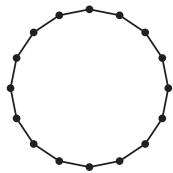
Figure 36.3.1–1 Example of proper and improper master surface orientation. The following output from a data check analysis (see “Abaqus/Standard, Abaqus/Explicit, and Abaqus/CFD execution,” Section 3.2.2) can be useful in identifying incorrectly oriented master surfaces: • Initial clearances can be displayed in Abaqus/CAE with a contour plot of the variable COPEN at increment 0 of the first step; initial overclosures correspond to negative clearances. • Abaqus/Standard provides a detailed printout of the model’s initial contact state. # Surface connectivity restrictions Certain connectivity restrictions apply to contact surfaces depending on the type of contact formulation. Surface connectivity restrictions for the various contact formulations are summarized in Table 36.3.1–1. As indicated in this table, the connectivity restrictions are sometimes different for master and slave surfaces. Self-contact surfaces act as both master and slave surfaces; therefore, if a restriction applies to either a master or slave surface, it also applies to self-contact. The potential connectivity restrictions referred to in Table 36.3.1–1 are described below: • Discontinuous surfaces: Discontinuous contact surfaces are allowed in many cases, but the master surface for finite-sliding, node-to-surface contact cannot be made up of two or more disconnected regions (they must be continuous across element edges in three-dimensional models or across nodes in two-dimensional models). Figure 36.3.1–2 shows examples of continuous surfaces, whereas Figure 36.3.1–3 and Figure 36.3.1–4 show examples of discontinuous surfaces. Figure 36.3.1–5 shows an automatically generated free surface resulting from the specification of an element set consisting of two disjointed groups of elements. The resulting surface is not continuous since it is composed of two disjoint open curves, so this surface would be invalid as a master surface for finite-sliding, node-to-surface contact. Table 36.3.1–1 Summary of which connectivity characteristics of element-based surfaces are allowed for various contact formulations.
Contact formulationConnectivity characteristics
Discontinuous (or 3D faces joined at only one node)T-intersection
Finite-sliding, node-to-surfaceMaster: Not allowed Slave: AllowedMaster: Not allowed Slave: Allowed
Small-sliding, node-to-surfaceMaster: Allowed Slave: AllowedMaster: Not allowed Slave: Allowed
Finite-sliding, surface-to-surfaceMaster: Allowed Slave: AllowedMaster: Allowed Slave: Allowed
Small-sliding, surface-to-surfaceMaster: Allowed Slave: AllowedMaster: Allowed Slave: Allowed
![](images/page-479_d4f6d05a33896490b80c850b18f0f93f34a346d631bc7ba10459bd1331e35ace.jpg)
natural_image Simple geometric diagram of a circle with evenly spaced dots (no text or symbols)
Closed 2D surface ![](images/page-479_514880e748366b83e00b36f4dd504cdaabaad093dca16a1fb7cdffa8a0323656.jpg)
natural_image 3D wireframe cube composed of triangular facets, no text or symbols present
Closed 3D surface ![](images/page-479_3552cfec1617219738d51954e9097297753591d033d5cb5e843633341a8ab951.jpg) Open 2D surface ![](images/page-479_099353d66754ab314edc3354b4e22ab13b30f4664831a1015c439cdced8a820b.jpg)
natural_image Geometric pattern of gray squares with diagonal lines forming triangles (no text or symbols)
Open 3D surface Figure 36.3.1–2 Examples of continuous surfaces. ![](images/page-479_9994a975cc644b44aefbd3c39a20413b08df472781f4bbcf47de88c2fca1cca4.jpg) ![](images/page-479_fd4725a2766143fb9f6f155841cb98b2bfd6aa54bf5ae7a07ac7c1ce2831a277.jpg) Figure 36.3.1–3 Example of a discontinuous 2D surface. ![](images/page-480_b3e59e3af69282edf0d1f0aab0d41f2c0610dc2f0991ccf390603a6c5e0090e2.jpg)
natural_image Geometric pattern of four triangles within a rectangle, no text or symbols present
![](images/page-480_fc7d6ac02991c502c318667d93366a2e63dd401a7fe2629fd6cafc17e020cda4.jpg)
natural_image Geometric pattern of four triangles within a square divided into four quadrants (no text or symbols)
Figure 36.3.1–4 Example of a discontinuous 3D surface. ![](images/page-480_c7508f83c5f5a49e8f5f6ba2d625edbeb650949befbef247bd1fb66b77b0965e.jpg)
text_image user-specified element set
![](images/page-480_0bfdd3f6c1074eae0d405051c3dbd5b393881363c869b79ed9b1e028554331d1.jpg)
text_image automatically generated free surface
Figure 36.3.1–5 Example of a discontinuous surface resulting from automatic free surface generation with a disjoint element set. • Portions of three-dimensional surfaces joined at only one node: The finite-sliding, node-to-surface contact formulation also does not allow three-dimensional master surface faces to be joined at a single node (they must be joined across a common element edge). Figure 36.3.1–6 shows an example of a surface with two faces connected by a single node.